







Intégration de proxy Firefox
L’intégration de Firefox avec les proxys Bright Data permet une navigation sécurisée et anonyme, offrant une gestion flexible des proxys pour un Scraping web et une collecte de données efficaces.
Ce guide peut être obsolète. Pour un guide à jour, veuillez consulter notre documentation.

- 400M+ IPs résidentielles
- Sessions persistantes et rotatives
- Taux de succès de 99,95%
- Ciblage géographique - GRATUIT

Intégration de proxy Firefox

Accédez aux paramètres Firefox :
Cliquez sur les trois points verticaux dans le coin supérieur droit pour accéder au menu, puis sélectionnez “Paramètres”.

Accéder aux paramètres réseau :
Faites défiler vers le bas pour trouver “Paramètres réseau” et cliquez sur le bouton “Paramètres” adjacent.

Configurer le proxy manuel :
Choisissez “Configuration manuelle du proxy” parmi les options disponibles.
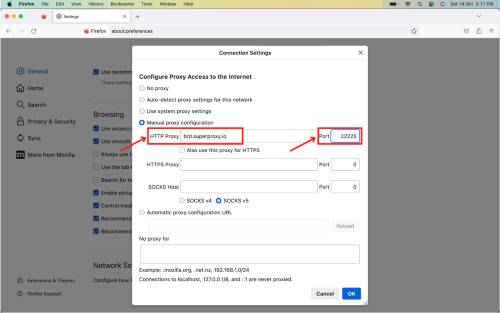
Saisir les détails du proxy :
Dans le champ “Proxy HTTP“, entrez l’hôte de Bright Data : brd.superproxy.io
Pour le “Port“, saisissez 33335.

Gérer les visites sans proxy :
Dans la section “Pas de proxy pour”, spécifiez les sites Web ou adresses auxquels vous souhaitez accéder sans utiliser le proxy. Une fois terminé, cliquez sur “OK” pour appliquer et enregistrer les configurations.

Authentifiez votre compte :
Lors de la visite d’un site Web, une fenêtre contextuelle vous demandera vos identifiants. Entrez votre “Nom d’utilisateur” et votre “Mot de passe” dans les champs respectifs. Une fois terminé, connectez-vous et commencez.
Bravo ! Vous avez configuré avec succès les proxys Bright Data sur votre navigateur Mozilla Firefox.
⚠️Note importante : Si vous utilisez les Proxys résidentiels, le Web Unlocker ou l’API SERP de Bright Data, vous devez installer un certificat SSL pour activer des connexions sécurisées de bout en bout vers vos sites Web cibles. C’est un processus simple, consultez https://docs.brightdata.com/general/account/ssl-certificate#installation-of-the-ssl-certificate pour les instructions.
Get proxies for Firefox

Alimenté par une infrastructure de proxy résidentiel primée
Plus de 400M+ monthly d’adresses IP résidentielles, la meilleure technologie avec la possibilité de cibler n’importe quel pays, ville et opérateur mobile font de nos services de proxy premium le meilleur choix pour les développeurs.


Un proxy pour chaque voie de développement
Combinez réseaux, pairs et IPs pour optimiser votre flux continu de données web.


Tarification du réseau proxy


- Volumes de données illimités
- Places illimitées
- Accord de service Premium
- 99.99% de disponibilité du réseau
- Proxy Manager gratuit
- Couverture complète des données
- Prix sur mesure par Go
- Solutions sur mesure
- Volumes de données illimités
- Places illimitées
- Accord de service Premium
- 99.99% de disponibilité du réseau
- Proxy Manager gratuit
- Couverture complète des données
- Prix sur mesure par Go
- Solutions sur mesure
- Volumes de données illimités
- Places illimitées
- Accord de service Premium
- 99.99% de disponibilité du réseau
- Proxy Manager gratuit
- Couverture complète des données
- Prix sur mesure par Go
- Solutions sur mesure
- Volumes de données illimités
- Places illimitées
- Accord de service Premium
- 99.99% de disponibilité du réseau
- Proxy Manager gratuit
- Couverture complète des données
- Prix sur mesure par Go
- Solutions sur mesure

Leader de la catégorie des proxys et de la collecte de données


